AZURE HEROES
  • Home-Updates
  • Blog
    • Azure Blog
    • Azure Heroes Events >
      • Azure Heroes Sessions #1
      • Azure Heroes Sessions #2
      • Azure Heroes Sessions #3
      • Azure Heroes Sessions #4
      • Azure Heroes Sessions #5
      • Azure Heroes Sessions #6
      • Azure Heroes Sessions #7
  • Who We Are!
  • eBooks
  • Azure All In One!
    • Azure Disk & Storage
    • Azure Network
    • Azure VPN
    • Azure VMs
  • Free Azure Support!
  • Contact Us
  • Events
    • Beginners Event
    • Developers Event
    • Special Event
    • Azure Workshop #4
    • Azure Workshop #5
    • Azure Workshop #6
    • Azure Workshop #7
    • Azure Workshop #8
    • Azure Heroes Sessions #9
    • Azure Heroes Sessions #10
    • Azure Heroes Sessions #11
    • Azure Heroes Sessions #12
    • Azure Heroes Sessions #13
    • Azure Heroes Sessions #14
    • Azure Heroes Sessions #15
    • Azure Heroes Sessions #16
    • Azure Heroes Sessions #17
    • Azure Heroes Sessions #18
  • Registration Form
  • Privacy Policy
  • Home-Updates
  • Blog
    • Azure Blog
    • Azure Heroes Events >
      • Azure Heroes Sessions #1
      • Azure Heroes Sessions #2
      • Azure Heroes Sessions #3
      • Azure Heroes Sessions #4
      • Azure Heroes Sessions #5
      • Azure Heroes Sessions #6
      • Azure Heroes Sessions #7
  • Who We Are!
  • eBooks
  • Azure All In One!
    • Azure Disk & Storage
    • Azure Network
    • Azure VPN
    • Azure VMs
  • Free Azure Support!
  • Contact Us
  • Events
    • Beginners Event
    • Developers Event
    • Special Event
    • Azure Workshop #4
    • Azure Workshop #5
    • Azure Workshop #6
    • Azure Workshop #7
    • Azure Workshop #8
    • Azure Heroes Sessions #9
    • Azure Heroes Sessions #10
    • Azure Heroes Sessions #11
    • Azure Heroes Sessions #12
    • Azure Heroes Sessions #13
    • Azure Heroes Sessions #14
    • Azure Heroes Sessions #15
    • Azure Heroes Sessions #16
    • Azure Heroes Sessions #17
    • Azure Heroes Sessions #18
  • Registration Form
  • Privacy Policy

Utilizing Terraform Providers to Deploy or Reference Another Azure Subscription

8/30/2023

0 Comments

 
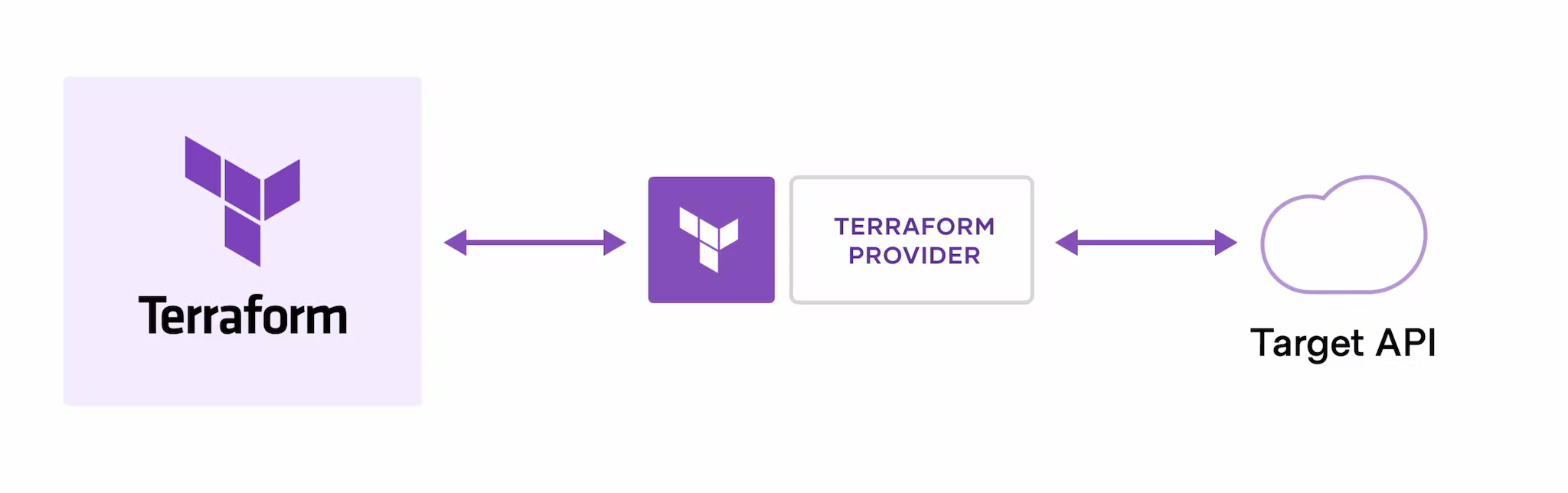
Employing a Terraform Provider tailored for Azure enables seamless interaction with Azure resources and services through Terraform. When targeting deployment to an alternate Azure subscription, specifying the subscription ID within the provider block of your Terraform configuration file is pivotal.
Picture
Below illustrates the methodology of specifying the subscription ID within the provider block for both single and multiple subscription scenarios:

# Single provider reference
provider "azurerm" {
  features {}
}

# Multiple providers referencing different subscriptions
provider "azurerm" {
  subscription_id = "subscription-id-2"
  features {}
  alias = "hub_sub"
}

provider "azurerm" {
  subscription_id = "subscription-id-3"
  features {}
  alias = "spoke_sub"
}

In the provided Terraform configuration, three Azure azurerm providers are delineated, each aligned with a distinct subscription ID. The initial provider serves as the default, while the subsequent two are aliased as "subscription_2" and "subscription_3" correspondingly. This enables unambiguous referencing of each provider in Terraform configurations, facilitating resource creation or referencing across multiple subscriptions.
Deployment across disparate Azure subscriptions necessitates a combined approach of authenticating to each subscription and configuring Terraform accordingly. Preceding this endeavor, ensuring that the designated service principal possesses requisite permissions across all target subscriptions is imperative.
In the subsequent example, the deployment of three resource groups into separate subscriptions is exemplified through the establishment of requisite providers within provider.tf:

# Default provider
provider "azurerm" {
  subscription_id = "subscription-id-1"
  features {}
}

provider "azurerm" {
  subscription_id = "subscription-id-2"
  features {}
  alias = "subscription_2"
}

provider "azurerm" {
  subscription_id = "subscription-id-3"
  features {}
  alias = "subscription_3"
}

The above configuration delineates three provider blocks, each designated with a distinct subscription ID. The initial block serves as the default, while the subsequent blocks are aliased, enabling precise specification of the provider to utilize when creating resources.
In a main.tf file, deployment of resource groups across relevant provider subscriptions can be accomplished as follows:

resource "azurerm_resource_group" "tamops1" {
  name     = "resource-group-sub1"
  location = "uksouth"
}

resource "azurerm_resource_group" "tamops2" {
  name     = "resource-group-sub2"
  location = "uksouth"
  provider = azurerm.subscription_2
}

resource "azurerm_resource_group" "tamops3" {
  name     = "resource-group-sub3"
  location = "uksouth"
  provider = azurerm.subscription_3

Adhering to best practices, such as employing separate provider blocks for each subscription, utilizing aliases for clarity, leveraging Terraform modules for infrastructure reuse, and judiciously employing the provider attribute for precise specification, ensures robust management of multiple subscriptions with Terraform.

0 Comments


Leave a Reply.

    Author

    Mohammad Al Rousan is a Microsoft MVP (Azure), Microsoft Certified Solution Expert (MCSE) in Cloud Platform & Azure DevOps & Infrastructure, An active community blogger and speaker. Al Rousan has over 11 years of professional experience in IT Infrastructure and very passionate about Microsoft technologies and products.

    Picture
    Picture
    Top 10 Microsoft Azure Blogs

    Archives

    January 2025
    December 2024
    November 2024
    October 2024
    September 2024
    July 2024
    June 2024
    May 2024
    April 2024
    February 2024
    September 2023
    August 2023
    May 2023
    November 2022
    October 2022
    July 2022
    June 2022
    May 2022
    April 2022
    March 2022
    February 2022
    January 2022
    December 2021
    November 2021
    May 2021
    February 2021
    December 2020
    November 2020
    October 2020
    September 2020
    August 2020
    June 2020
    April 2020
    January 2020
    July 2019
    June 2019
    May 2019
    February 2019
    January 2019

    Categories

    All
    AKS
    Azure
    Beginner
    CDN
    DevOps
    End Of Support
    Fundamentals
    Guide
    Hybrid
    License
    Migration
    Network
    Security
    SQL
    Storage
    Virtual Machines
    WAF

    RSS Feed

    Follow
    Free counters!
Powered by Create your own unique website with customizable templates.